Coming soon
Your own Root on your computer.
A Root made to measure that runs on your computer. It reads only the accounts you connect, and what it reads goes through Claude, with your account.
How I run mine
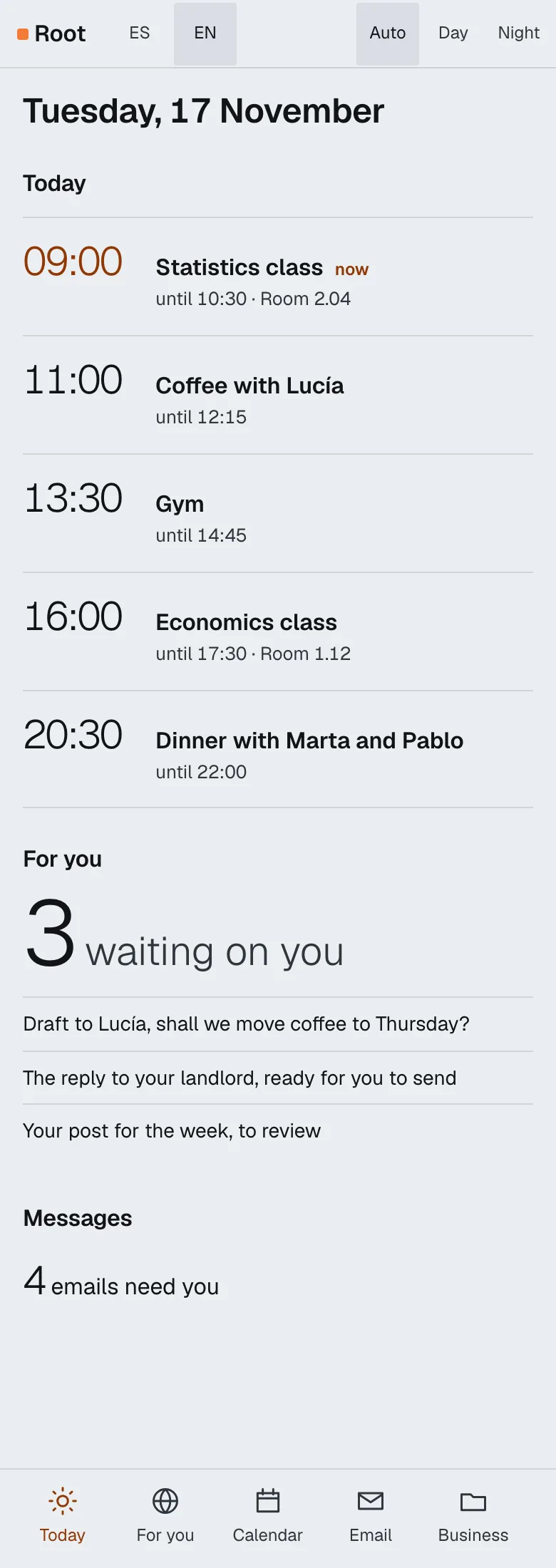
I've used it every day since April. This is how I open the morning. Tap each tab.
Today
Calendar
Any given Tuesday
- 09:00 Statistics class Room 2.04
- 11:00 Coffee with Lucía You added it
- 13:30 Gym Every Tuesday
- 16:00 Economics class Room 1.12, added by Root
- 20:30 Dinner with Marta and Pablo You added it
It adds classes on its own. A cancelled appointment it removes on its own and tells you in the report. Any other deletion waits for your yes.
Four emails that need you
- Lucía Shall we move coffee to Thursday? Reply written in Drafts
- Your landlord The boiler service Reply ready to send
- The registrar Room change on Thursday Added to the calendar
- The power company Your November bill Filed with its due date
Replies stay written. You send them, or tell it «send it».
Waiting for you
Three things waiting for your yes
- Send The reply to Lucía Written, you send it
- Pay The power bill, before Friday Ready, you press pay
- Post Your post for the week Text and photo ready
Anything that reaches another person or pays waits for your yes.
What it will do
The morning and night report
What you have today, what came in and what's yours to do, when you wake up and before bed.
Classes into your calendar
Reads your timetable and puts each class in your calendar, with its room.
Messages in your voice
Leaves the replies you owe written the way you would write them.
Finances
Notes your invoices with their due dates, sorts the month's spending and reminds you before anything is due.
Your posts, ready
Picks the photos, writes the text in your voice and leaves it ready to review.
What you have pending
Gathers what people ask of you by email and message, and reminds you in time.
You set the limits
You choose what it can access, how far it goes on its own in each thing and where it hits a ceiling. Payments have a fixed one: Root prepares them and you press pay.
This is how it comes: anything that reaches another person, deletes or pays waits for your yes. Change it any time.
Drag the line on each row, or use the arrow keys.
The case Your landlord writes to arrange a visit from the boiler technician.
With the line here (as it comes) You say «send it» and Root sends it. Without your word, it stays in Drafts.
With the line as it comes, at «Acts when you ask». What would happen at each point:
- Root does nothing on its own. Root doesn't open your email. The message waits for you, unread.
- Root does everything up to «Reads» on its own. Root reads it and mentions it in your morning report.
- Root does everything up to «Sorts» on its own. Root moves it to the top, with what's yours to do this week.
- Root does everything up to «Prepares» on its own. Root leaves the reply in Drafts, based on your free slots.
- Root does everything up to «Acts when you ask» on its own. You say «send it» and Root sends it. Without your word, it stays in Drafts.
- Root does everything up to «Sends» on its own. Root replies on its own with your first free slot and tells you. Only if you set it up that way.
Calendar
The case A Thursday class moves to another room and another time.
With the line here (as it comes) You say «move it» and Root moves the class and sends the message. Without your word, it stays pencilled in.
With the line as it comes, at «Acts when you ask». What would happen at each point:
- Root does nothing on its own. Root doesn't look at your calendar. You find the change yourself.
- Root does everything up to «Reads» on its own. Root spots the notice and tells you in your report.
- Root does everything up to «Sorts» on its own. Root marks the class on your day and warns you it clashes with the eleven o'clock coffee.
- Root does everything up to «Prepares» on its own. Root pencils in the moved class and leaves a message to move the coffee.
- Root does everything up to «Acts when you ask» on its own. You say «move it» and Root moves the class and sends the message. Without your word, it stays pencilled in.
- Root does everything up to «Sends» on its own. Root moves the class on its own and tells you. Only if you set it up that way.
Messages
The case A friend writes «dinner on Thursday or Friday?».
With the line here (as it comes) You say «Friday» and Root replies. Without your word, the reply stays written.
With the line as it comes, at «Acts when you ask». What would happen at each point:
- Root does nothing on its own. Root doesn't read your messages.
- Root does everything up to «Reads» on its own. Root reads it and puts it in your report.
- Root does everything up to «Sorts» on its own. Root adds it to what you have pending and reminds you to reply.
- Root does everything up to «Prepares» on its own. Root leaves the reply written, in your voice, based on your week.
- Root does everything up to «Acts when you ask» on its own. You say «Friday» and Root replies. Without your word, the reply stays written.
- Root does everything up to «Sends» on its own. Root replies on its own based on your week and tells you. Only if you set it up that way.
Content
The case Today you did something that deserves a post.
With the line here (as it comes) You say «post it» and Root posts it. Without your word, it stays a draft.
With the line as it comes, at «Acts when you ask». What would happen at each point:
- Root does nothing on its own. Root doesn't touch your social accounts.
- Root does everything up to «Reads» on its own. Root reads what you posted and the comments, and sums them up.
- Root does everything up to «Sorts» on its own. Root sorts the day's photos and suggests the best three.
- Root does everything up to «Prepares» on its own. Root leaves the post written in your voice, with the photo you picked.
- Root does everything up to «Acts when you ask» on its own. You say «post it» and Root posts it. Without your word, it stays a draft.
- Root does everything up to «Sends» on its own. Root posts on its own whatever fits your rules and tells you. Only if you set it up that way.
Finances
The case The power bill arrives, due before Friday.
With the line here (as it comes) Root has the payment ready, with the amount and who it's for in plain view. You press pay.
Payments have a ceiling. Root prepares them and you press pay, even if you ask it to.
With the line as it comes, at «Prepares». What would happen at each point:
- Root does nothing on its own. Root doesn't look at your accounts or your bills.
- Root does everything up to «Reads» on its own. Root reads the bill and puts it in your report, with its due date.
- Root does everything up to «Sorts» on its own. Root files it with the month's bills and reminds you two days before it's due.
- Root does everything up to «Prepares» on its own. Root has the payment ready, with the amount and who it's for in plain view. You press pay.
You can't sign up yet. When it opens, it will say so here.